Solar project software for installer teams in India

Stop rebuilding the same solar project at every handoff.

PVspark keeps customer details, site evidence, designs, tariff and bill assumptions, pricing, proposals, and handover records connected—so every team can pick up where the last one left off.

Built for installer and EPC teams delivering residential and C&I solar projects.

PVspark project workspace showing a solar project timeline, workflow stages, and guided assistant
Synthetic project data shown. Guided actions stay tied to the open workspace and require confirmation.
  1. 01Lead
  2. 02Survey
  3. 03Design
  4. 04Estimate
  5. 05Proposal
  6. 06Handover

See the handoff, not a feature checklist

One solar project. Three moments teams usually have to reconstruct.

PVspark keeps the source context, current decisions, and next action connected as work moves between roles. The screens below use synthetic project data.

  1. 01Opportunity to project

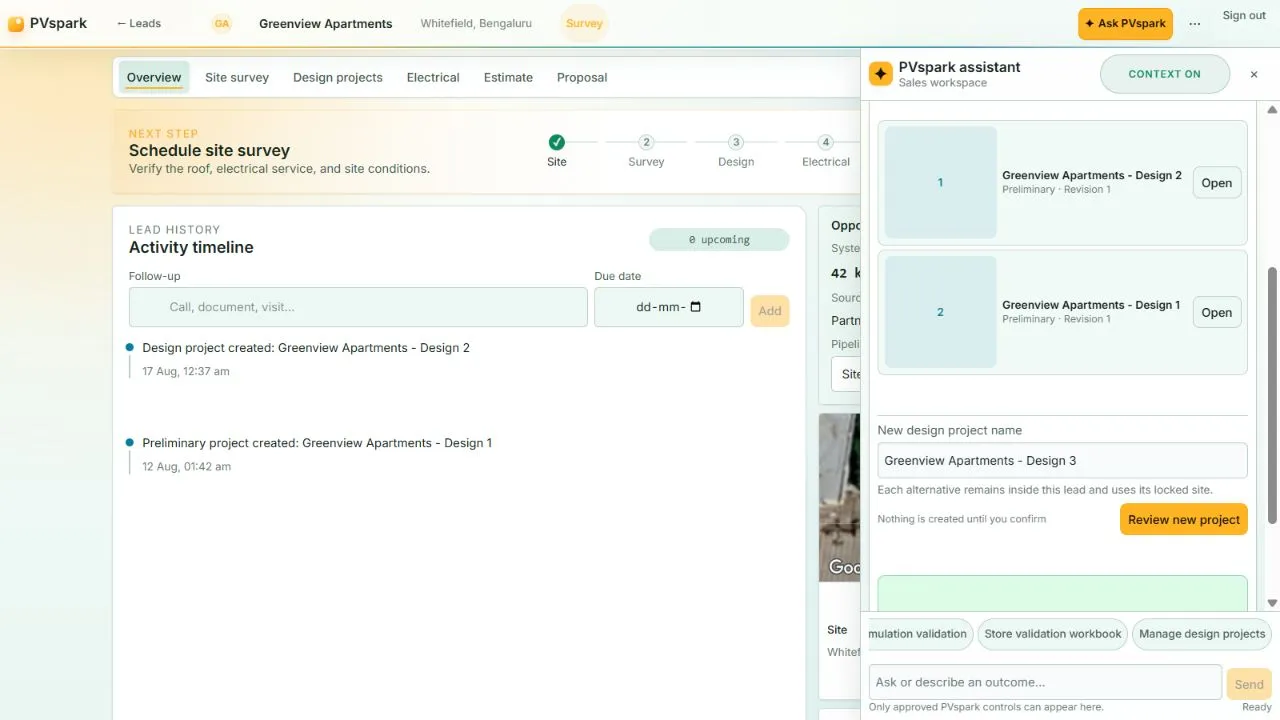
    The site and next step travel with the lead

    Sales can schedule the survey and create design options while the confirmed customer and site context stays in view.

    PVspark lead workspace with activity timeline, project stages, site context, and guided design-project actions
  2. 02Estimate to commercial case

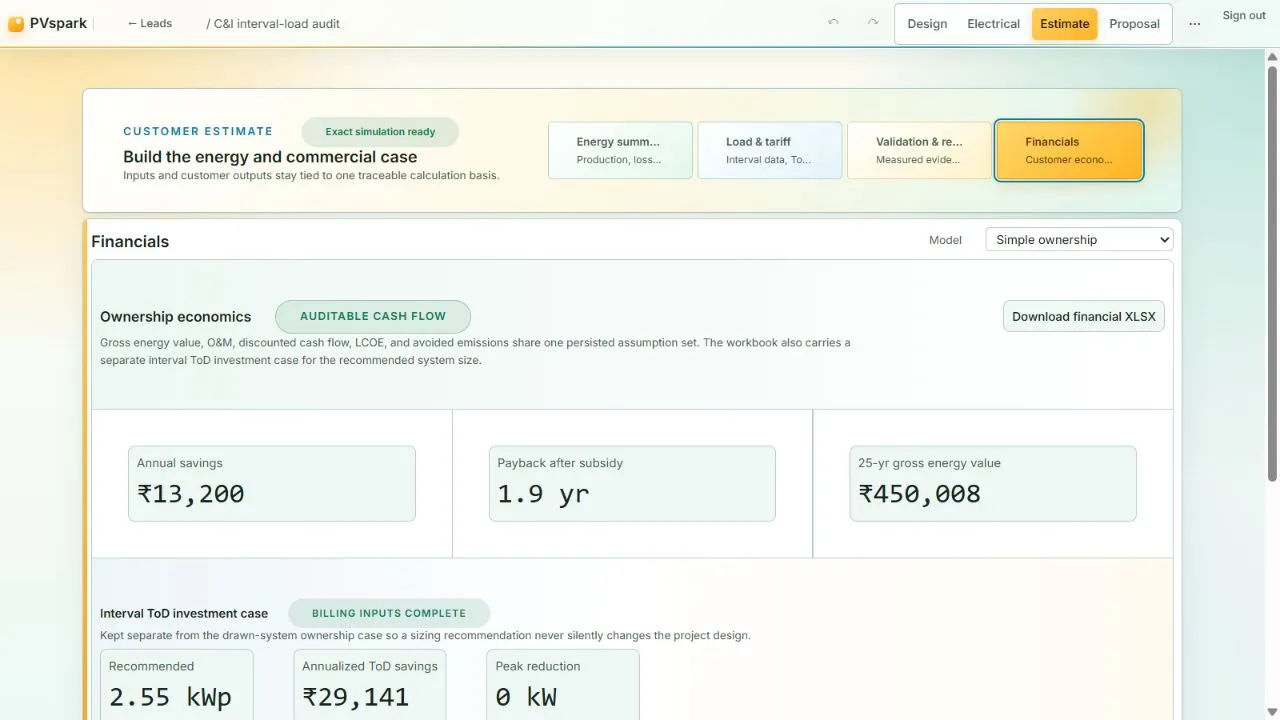
    Load, tariff, design, and financials share one basis

    Energy, interval data, ToD terms, pricing, and ownership or RESCO assumptions remain traceable to the project being discussed.

    PVspark financial workspace with ownership economics, interval time-of-day investment case, and workbook controls
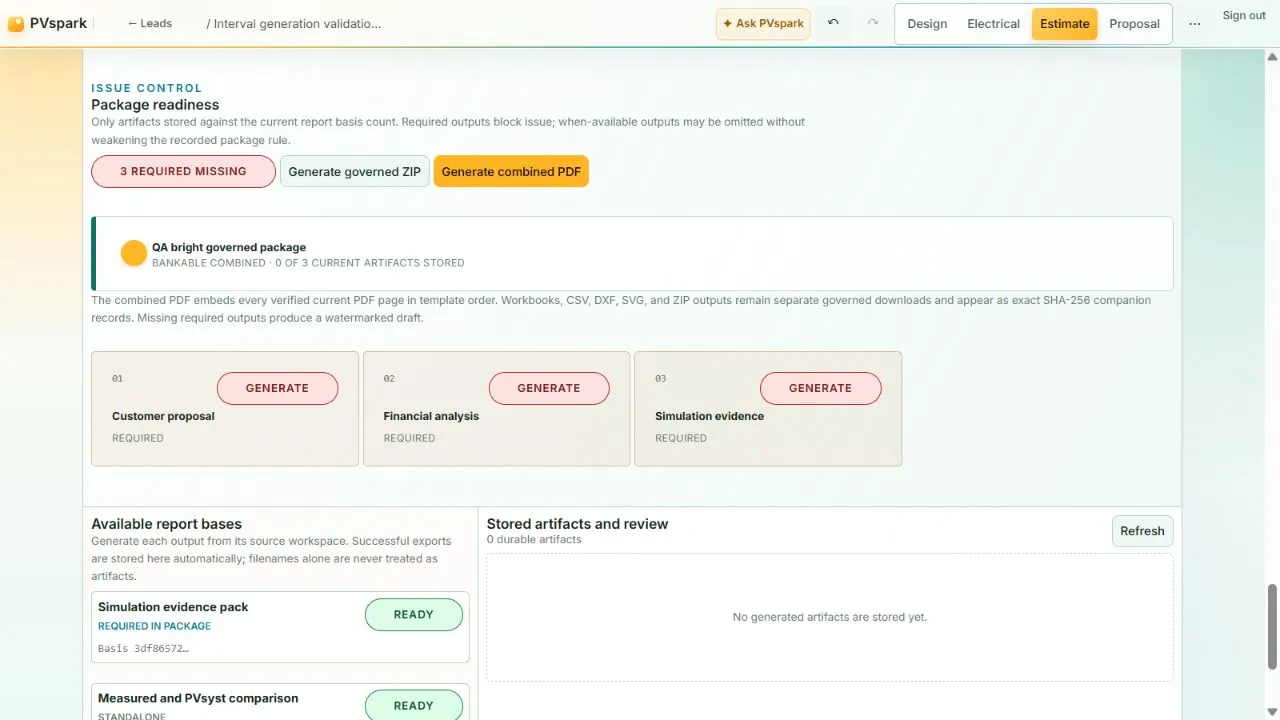
  3. 03Proposal to handover

    The package shows what is current and what is missing

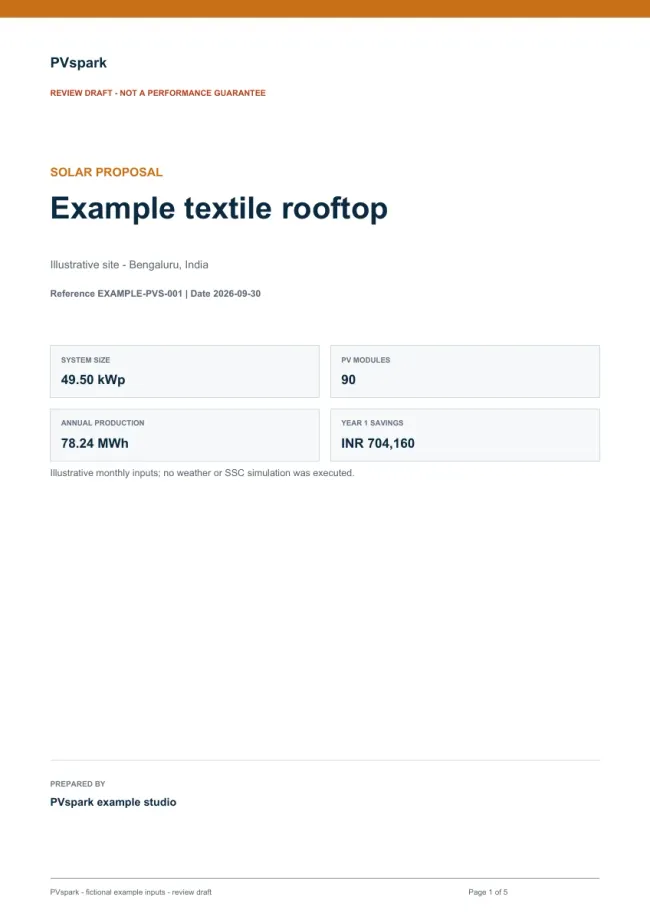
    Customer, financial, simulation, and engineering outputs can be assembled against the right revision with readiness visible before issue.

    PVspark report package workspace showing required outputs, package readiness, and stored artifact review

Compare before you commit

See what a design change means before it becomes the project.

Review rooftop alternatives and ground-mount terrain proposals with the inputs, coverage, and limits alongside the result.

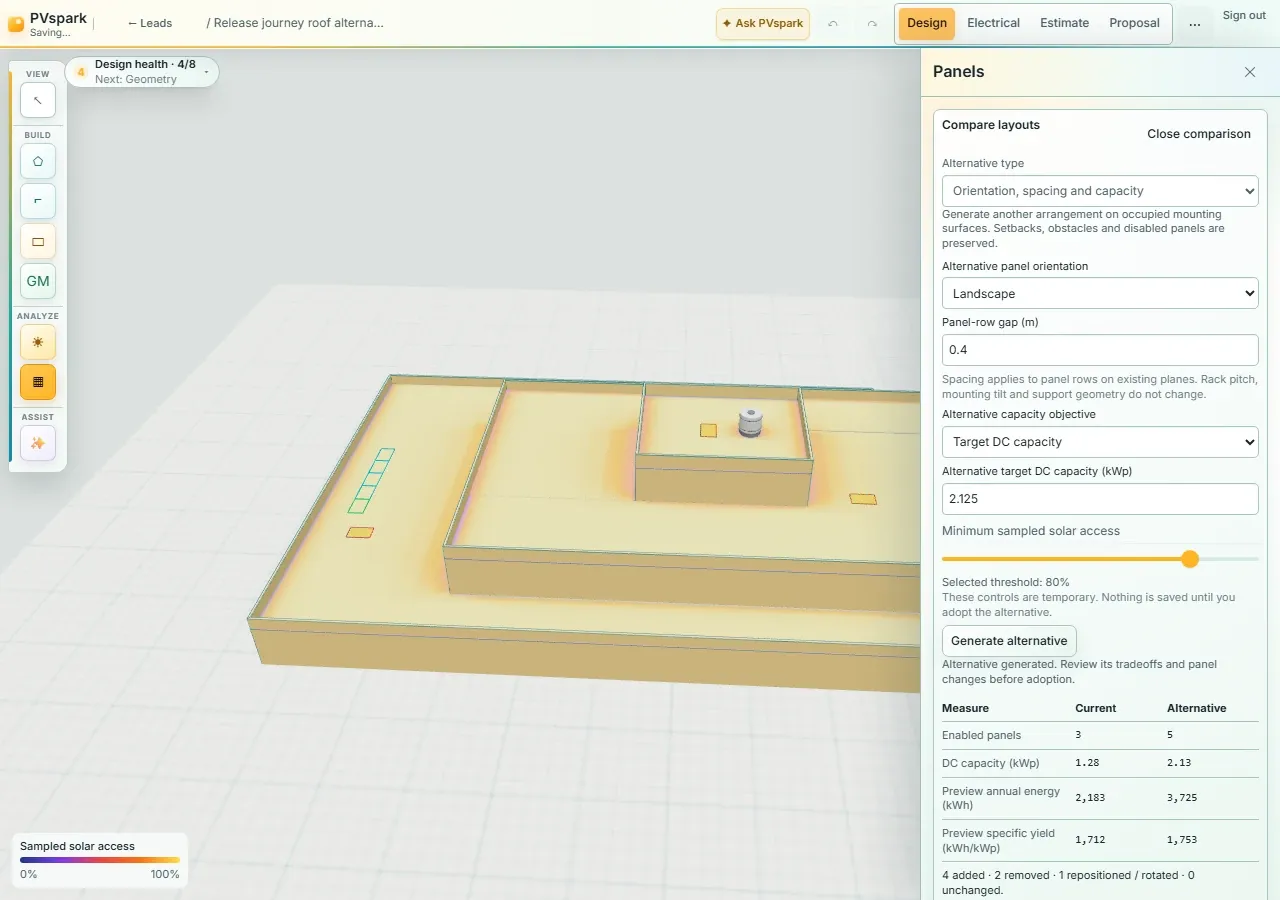
Try another rooftop layout

Compare orientation, panel-row spacing, capacity, and approximate energy. Inspect the changes in 3D, then review and adopt the selected layout with undo.

Explore layout comparisons →

Bring terrain into the decision

Save grading options, compare cut and fill, and check fixed-table clearances and height proposals over supported terrain. Keep site and engineering review in the loop.

Explore terrain studies →

Inspect the sunlight trade-off

Compare direct sunlight before and after a grading and height proposal using the same sun inputs. This is a screening snapshot of incident light, not annual electrical yield.

Explore energy and sunlight →

One project record, the full working journey

More than design software. More useful than another disconnected system.

Start with the customer and site. Carry the same context through layout, electrical work, energy, tariffs, pricing, proposals, reports, and team handover.

01

Sales and project workflow

Keep the opportunity connected to the project it becomes

Give sales and delivery one solar-specific record for the customer, site, next action, survey, and design work that follows.

  • Configurable lead stages
  • Tasks and follow-ups
  • Survey scheduling
  • Lead-scoped design projects
Explore capability
02

Site survey

Give the next team more than a folder of site photos

Capture site conditions, measurements, electrical context, access notes, and evidence in the project where design and delivery can use it.

  • Structured survey sections
  • Project-linked evidence
  • Visit scheduling
  • Visible open questions
Explore capability
03

Solar design

Turn confirmed site context into a layout your team can review

Build rooftop and fixed-tilt ground-mount layouts, then compare rooftop alternatives before changing the recorded design.

  • Rooftop and fixed-tilt ground mount
  • Layout alternatives and 3D review
  • Shared-basis energy previews
  • Reviewed adoption and undo
Explore capability
04

Ground-mount terrain

Compare the ground, the grading plan, and the tables together

Use recorded elevation controls to screen terrain, compare grading options, and review fixed-table clearances before adopting a change.

  • Source and coverage checks
  • Saved grading options
  • Clearance and height proposals
  • 3D comparison and reports
Explore capability
05

Electrical design

Carry the array layout into coordinated electrical deliverables

Develop stringing, circuits, routes, cable and protection screens, equipment locations, and a synchronized set of reviewable outputs.

  • Manual and automatic stringing
  • Cable and protection screening
  • Surveyed routes
  • SLD, DXF, BOM and workbooks
Explore capability
06

Energy and validation

Explain the energy estimate with the evidence behind it

Connect shading, losses, year-long simulation, uncertainty, and measured or PVsyst comparison to the project version that produced the result.

  • Shading and loss analysis
  • Direct-sunlight proposal screening
  • Year-long SSC simulation
  • P50/P90 and validation evidence
Explore capability
07

Load, tariffs, and financials

Build the commercial case around the customer’s real load and tariff

Bring interval meter data, utility-bill evidence, reviewed India tariff options, energy results, and commercial assumptions into one auditable estimate.

  • Interval and bill evidence
  • Reviewed India tariff options
  • ToD and demand analysis
  • CAPEX, RESCO, and sensitivities
Explore capability
08

Equipment and pricing

Keep equipment, supplier pricing, and project margins aligned

Connect a managed equipment library, approved organization price books, supplier evidence, and immutable project pricing snapshots to the BOM.

  • Managed equipment library
  • Versioned price books
  • Supplier quote provenance
  • BOM coverage and margins
Explore capability
09

Proposals and reports

Issue customer and project handover packages from the right version

Prepare proposals, analysis workbooks, engineering companions, and branded report packages without disconnecting them from their source revision.

  • Customer proposal PDF
  • Report Center and templates
  • Combined PDF and ZIP packages
  • Review and issue history
Explore capability
10

Team and workspace control

Give every role the context and access needed for its next decision

Manage members, invitations, roles, revisions, activity, support, API credentials, usage, and retention without opening the whole organization to everyone.

  • Organization roles and invitations
  • Audit and revision history
  • Time-bounded support
  • Scoped API credentials
Explore capability
11

Guided PVspark assistant

Ask for the next step without giving up control of the project

Use the active lead, project, and workspace as context for readiness checks, navigation, and selected confirmed actions.

  • Workspace-aware guidance
  • Readiness reviews
  • Preview and confirmation
  • Receipts and stale-context guards
Explore capability

Built around Indian project evidence

Connect the design to the bill, tariff, and commercial decision.

PVspark brings supported interval data, utility-bill evidence, reviewed tariff options, project pricing, and financial analysis beside the solar model—without pretending every customer or jurisdiction is identical.

Explore tariffs and financials →
01

Customer evidence stays visible

Meter direction, CT/PT scaling, data gaps, bill reconciliation, and the tariff basis remain part of the analysis trail.

02

Design and sizing stay distinct

Compare the drawn system with supported load and ToD sizing views without silently changing the project layout.

03

The commercial case can be reviewed

Ownership, CAPEX-versus-RESCO, and sensitivity workbooks retain the assumptions that produced them.

Designed for the whole delivery team

Give every role the context for its next decision.

Each role gets the workspace it needs while the customer, site, project version, evidence, and handover trail stay connected underneath.

Installer owners

See project status, ownership, next steps, and current handover material without rebuilding the story from messages.

Sales teams

Move a qualified lead into survey, design, estimate, and proposal work with the customer and site context intact.

Survey and design teams

Keep field evidence, geometry, layouts, assumptions, and named revisions in the same project trail.

Engineering and commercial teams

Coordinate electrical outputs, load and tariff evidence, pricing, financials, and report packages.

Ask PVspark

Guidance that knows which project is open—and asks before it acts.

Ask PVspark can inspect the active lead or project, explain what is ready, open the right workspace, and help with selected actions across sales, design, electrical, commercial, and reporting work.

  • See the exact proposed change before confirmation.
  • Keep receipts and bounded undo where supported.
  • Stop stale actions when the open customer or project changes.
See guided assistance →

Trust the trail, not a mystery output

Know where the number, file, and decision came from.

PVspark keeps inputs, revisions, approvals, access, and limitations visible around professional solar work.

The current version is clear

Named revisions and current-versus-historical report bases make it easier to see which project state produced an output.

Assumptions travel with the result

Energy, tariff, financial, and pricing workbooks retain the evidence and calculation basis needed for review.

Access follows responsibility

Organization roles, invitations, scoped credentials, audit history, and deliberate support access keep work bounded.

Hosted files are handled deliberately

Supported uploads use private object storage, malware scanning, retention controls, backup, and recovery paths.

Bring PVspark into your workflow

Move from disconnected tools to one connected project record.

Start with the workflow causing the most rework, then connect sales, survey, design, commercial, reporting, and handover around the same project.

We will help map roles, data, access, and onboarding so your team can adopt PVspark without losing the specialist tools it still needs.

Common questions

What teams usually want to know first

Start with product fit. The detailed scope, responsibilities, and access terms come before onboarding.

Who is PVspark for?

PVspark is built for installer and EPC teams delivering residential and C&I solar projects, particularly organizations in India that move work across sales, survey, design, commercial, and delivery roles.

Can we see PVspark with our workflow?

Yes. Request a focused demonstration and tell us which handoff or decision matters most. Demonstrations use clearly labelled synthetic project data.

Do we have to replace every tool we already use?

No. PVspark can begin with the handoff creating the most friction while useful specialist tools, exports, and operating practices remain in place.

Does PVspark guarantee energy, savings, or engineering outcomes?

No. Estimates and financial results depend on recorded inputs and assumptions. Site conditions, codes, utility rules, manufacturer instructions, and qualified professional judgement remain authoritative.

How do we get started?

Request a demo or contact us. We will confirm the relevant workflows, roles, data boundaries, onboarding, access, support, and commercial terms before live project use.

See PVspark in action

Bring us the handoff your team keeps rebuilding

We will show the most relevant PVspark workflow with synthetic data, answer your questions, and map the right onboarding path for your team.

Essential security and preference storage remains available. Optional analytics is off unless you allow it. See cookies and storage.